Concept Clerk ★ Priority
The statutory backdrop
By law, a council must publish its agenda at least three clear working days before a meeting. Importantly, the legal requirement covers the titles of agenda items only - the body text (the supporting detail beneath each title) is not covered.
In practice this means a clerk can publish the item titles by the deadline, then add or refine the body text afterwards without breaching the regulations.
CouncilPapers is designed around this distinction. Understanding it makes the versioning system much easier to follow.
What Commit means
When you have finished preparing an agenda, you Commit it. Committing does two things:
- It locks the agenda - once committed, it cannot be edited directly
- It generates the agenda papers - the PDF documents are produced at this point
Commit is a deliberate, irreversible action. Think of it as signing off a document: you are confirming that this version is ready.
Why versions exist
Sometimes, after committing, you realise something needs to change. Because a committed agenda cannot be edited directly, CouncilPapers allows you to clone it to create a new version. The new version is a copy you can edit freely, while the original remains visible to councillors and the public.
When you are ready, you commit the new version - and then, as a separate step, you make it the active version using the Change Active Agenda button on the Meeting Page.
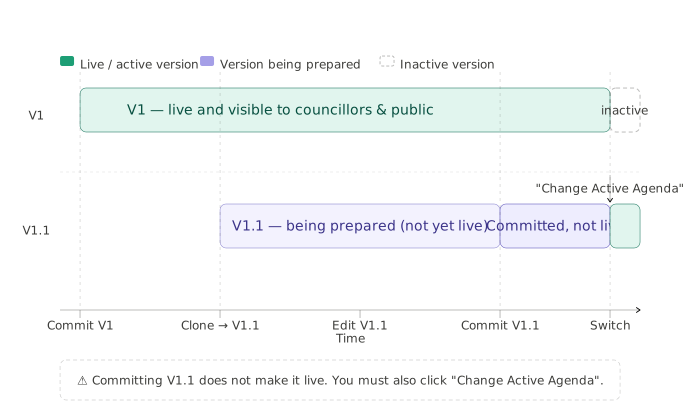
Versions are numbered automatically: the first agenda is V1, and clones become V1.1, V1.2, V2, and so on depending on which type of version you create.
Minor versions and major versions
When you clone a committed agenda, you choose between two version types. The choice matters because of the statutory publication rules.
Minor version (e.g. V1.1)
A minor version cannot add, remove, re-order, or re-title items. The item titles and running order remain exactly as published in the original - only the body text and supporting material can change.
Use a minor version when you want to add or improve body text after the publication deadline. Because the titles are unchanged, the original publication remains legally compliant.
Major version (e.g. V2)
A major version can add, remove, re-order and re-title items.
Use a major version only when a title genuinely must change - for example:
- A title contains confidential or legally sensitive content that must be removed
- A late planning application is received on the day of the meeting and needs to be added as a new item
Adding a major version after the original publication deadline means the council should consider whether re-publication and re-notification of councillors is appropriate. CouncilPapers will prompt you to notify councillors after committing.
The parallel working model
A key feature of the versioning system is that you can work on a new version while the original remains live.
For example: V1 is committed, active, and visible to councillors and the public. You clone it to create V1.1 and begin editing. Throughout this time, V1 remains the version everyone sees. Only when you commit V1.1 and use the Change Active Agenda button does V1.1 become the live version.
This means you never have to take a published agenda offline while making changes.
Important: committing and switching are two separate steps
This is the most common source of confusion with the versioning system.
Committing a new version does not automatically make it live. After committing V1.1, V1 will still be the version visible to councillors and the public until you explicitly switch.
To make a newly committed version live, go to the Meeting Page and click Change Active Agenda below the Agendas table (the button appears once the meeting has more than one version). On the page that opens, select the version you want with its radio button and click Make Live Agenda.
If you are not sure which version is currently live, the active version is marked with a tick in the Live column of the Agendas table.
The audit trail
Every version - committed or not - is listed on the Meeting Page with its version number, status, creation date and publication date, together with any version notes recorded when it was created. The published agenda papers themselves also carry the version number, so there is always a clear record of which version was in circulation at any point.
Last updated: 31 August 2026
See also
- Committing an agenda Procedure
- Creating a new version of an agenda Procedure
- Publishing and switching versions Procedure
- How to Create and Use a Library Item Procedure
Need more help? Contact us
Built by a councillor, for council clerks
Save hours of paperwork per meeting
Write agendas and minutes once and publish them straight to your council's website. Councillors get them in the Councillor App. No re-typing, no uploading files one by one. See the features
Records you can stand behind
Agendas and minutes are version-tracked and searchable, with public and confidential versions kept apart. That helps you stay audit-ready, though the council remains responsible for its own compliance. Overview for clerks
Open, accessible council papers
Every agenda and set of minutes has an on-screen version designed to meet WCAG 2.2 AA — the standard the Public Sector Bodies Accessibility Regulations 2018 require. Your council's data is stored in the UK. Accessibility statement
Councillors get agendas, papers and past minutes in one secure app, not a pile of email attachments. Overview for councillors
Read our story