Concept Clerk
What a council cycle is
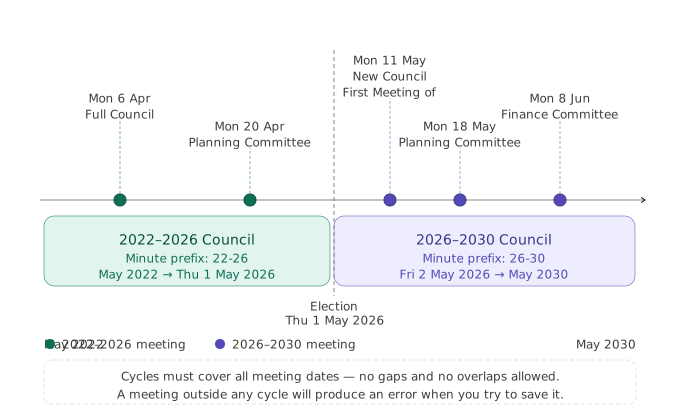
A council cycle is a named date range that groups your council's meetings into a block. Every meeting in CouncilPapers must fall within an existing council cycle — the system uses the meeting date to assign it to the correct cycle automatically.
Cycles are typically aligned to an elected council's term of office. For most parish and town councils this is four years, with elections in the first week of May. However a cycle can cover any date range that suits your council's needs.
Why cycles are required
Cycles serve two purposes in CouncilPapers:
Organising meetings into manageable blocks — rather than showing every meeting since the council began, cycles allow the system to focus on the current or recent period. This keeps meeting lists and searches relevant.
Providing a prefix for minute numbering — minutes in CouncilPapers
carry a unique page number. The cycle's minute prefix forms the basis of
this numbering, ensuring minutes from different cycles are clearly
distinguishable. For example, a cycle covering 2023–2027 might use the
prefix 23-27, producing minute references such as 23-27/001.
Cycle fields
| Field | Required | Notes |
|---|---|---|
| Cycle Name | Yes | A descriptive name for the cycle, e.g. "2023–2027 Council" |
| Minute Prefix | Yes | A short string used as the basis for minute numbering, e.g. 23-27 or 2023 |
| Start Date | Yes | The first date of the cycle |
| End Date | Yes | The last date of the cycle |
Cycles cannot overlap. The start date of a new cycle must fall after the end date of any existing cycle.
Where to manage cycles
Go to Council in the left-hand menu, then click Council Cycles. From here you can view existing cycles and create new ones.
When to create a new cycle
You will need to create a new cycle when:
- Your council is being set up for the first time (this is handled during onboarding)
- Your current cycle is approaching its end date and future meetings need to be created beyond that date
- You see the error "Meetings must fall within a pre-existing Council Cycle" when creating a meeting
When creating a new cycle, make sure the end date is far enough ahead to cover all planned meetings. A cycle can always be extended by editing its end date if needed.
Meetings are assigned automatically
You do not need to assign meetings to a cycle manually. When a meeting is created, CouncilPapers places it in the cycle whose date range covers the meeting date. If no cycle covers that date, the form will not save and an error will be shown.
Last updated: 17 June 2026
See also
- Creating a meeting Procedure
Need more help? Contact us
About CouncilPapers
Stop drowning in paperwork
Your meeting preparation shouldn't consume your week. Automate the tedious bits so you can focus on what matters.
Meeting records that stand up to scrutiny
Version-controlled, searchable, audit-proof—your agendas and minutes become a trusted record, not a liability.
Transparent, accessible council papers
Publish professional agendas and minutes to the web instantly. Show your community that decisions are made openly and carefully.