Concept Clerk ★ Priority
The meeting is the container
In CouncilPapers, a meeting is the top-level entity. It records the date, time, venue, and committee, and acts as a container for everything that belongs to that meeting — the agenda, the papers, and the minutes.
A meeting exists independently of its documents. You create the meeting first, then build the agenda inside it.
The agenda is not a Word document
This is the most important thing to understand about how CouncilPapers works.
In a traditional workflow, an agenda is a single Word document that the clerk writes from top to bottom. In CouncilPapers, an agenda is a structured collection of independent items. Each item exists in its own right — it has its own title, its own body text, its own papers, its own tags, and its own confidentiality setting.
The agenda PDF that councillors receive is generated from these items, but the items themselves are not locked inside a document. They are searchable, taggable, and linkable independently of one another.
This is what makes it possible to search for a single planning application across years of meetings, tag a project and track it through multiple committees, or mark one item as confidential while leaving its neighbours public.
Items are the fundamental unit
Each agenda item contains:
- A title — the heading that appears in the published agenda
- Agenda text — the body text beneath the title
- Papers and annexes — supporting documents attached to the item
- Tags — labels connecting this item to related items across meetings
- A confidential flag — controlling whether the item is visible publicly or to councillors only
- An internal notes field — visible to staff only, never published
Items can have sub-items. A parent item such as "Planning Applications to be Considered" might have ten child items beneath it, one per application. Each sub-item is its own independent entity with its own content, tags and papers.
The same items become the minutes
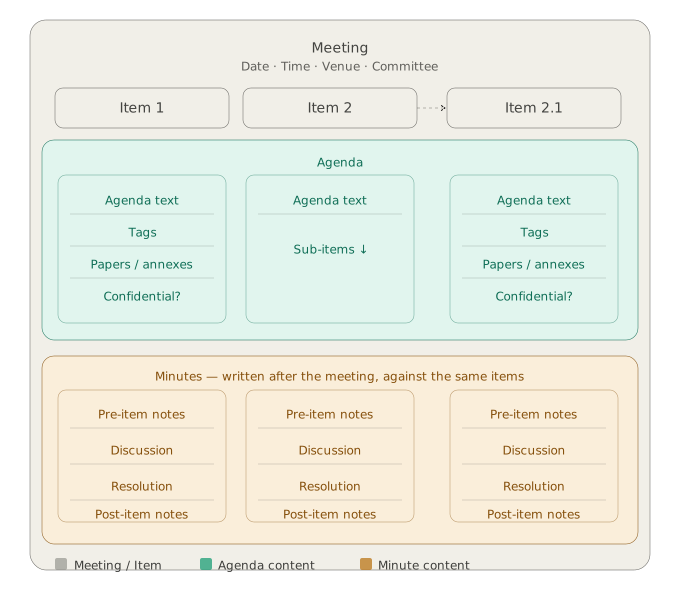
After the meeting has taken place, the clerk writes the minutes against the same items. No new structure is created — the agenda items are extended with minute content:
- Pre-item notes — for example, a councillor leaving the room
- Discussion and Resolution — the record of what was discussed and decided
- Post-item notes — for example, a councillor returning
The minutes are not a separate document written from scratch. They are the agenda items, with the meeting's record added to each one. This is why the published minutes look structurally identical to the agenda — they are the same items, now carrying both the agenda text and the minute text.
The diagram
The diagram below shows how these entities relate. Each item column spans both the Agenda and Minutes sections of the meeting, illustrating that the item is the same entity in both contexts. Item 2.1 is a sub-item of Item 2 — it has its own full set of content independently of its parent.
What this means in practice
For building agendas: Think in items, not in pages. Each distinct subject the council will discuss is one item. If a subject has multiple components — such as a list of planning applications — each component is a sub-item.
For writing minutes: You do not need to re-type the agenda. Work through each item in turn, adding what was discussed and decided. The system handles the formatting and page numbering.
For search: Because each item is independently indexed, a search for a planning reference, a project name, or a councillor's name will find exactly the relevant items — not a whole agenda document that happens to contain the term somewhere.
For confidentiality: Marking an item as confidential affects only that item. Its neighbours remain public. You do not need a separate confidential agenda document — CouncilPapers generates the public and confidential versions automatically from the same set of items.
Last updated: 17 June 2026
See also
- Creating a meeting Procedure
- Building an agenda Procedure
- Committing an agenda Procedure
- Writing minutes Procedure
- Agendas, Versions and Committing Concept
Need more help? Contact us
About CouncilPapers
Stop drowning in paperwork
Your meeting preparation shouldn't consume your week. Automate the tedious bits so you can focus on what matters.
Meeting records that stand up to scrutiny
Version-controlled, searchable, audit-proof—your agendas and minutes become a trusted record, not a liability.
Transparent, accessible council papers
Publish professional agendas and minutes to the web instantly. Show your community that decisions are made openly and carefully.