Concept Clerk ★ Priority
The statutory requirement
By law, a council must publish its agenda at least three clear working days before a meeting. This is a minimum — your council can choose to work to a longer notice period if preferred (and set it in your Publication Settings).
Clear days means the day of publication and the day of the meeting are both excluded from the count. Only the days in between are counted.
Working days in CouncilPapers are Monday to Saturday inclusive. Sundays are never counted. Bank holidays are also excluded from the count automatically.
If publication happens on a day that is not a working day (a Sunday or a bank holiday), it is treated as if it had happened on the previous working day — publishing on a non-working day does not gain you any extra time.
An example
A Full Council meeting is scheduled for Monday 22 June. Working backwards:
| Day | Counts? |
|---|---|
| Monday 22 June | Meeting day — excluded |
| Sunday 21 June | Sunday — excluded |
| Saturday 20 June | Working day 1 |
| Friday 19 June | Working day 2 |
| Thursday 18 June | Working day 3 |
The agenda must therefore be published by the end of Wednesday 17 June — the last day before the three clear working days begin.
If a bank holiday fell on Friday 19 June, that day would not count as a working day, and the deadline would move back one further day to Tuesday 16 June.
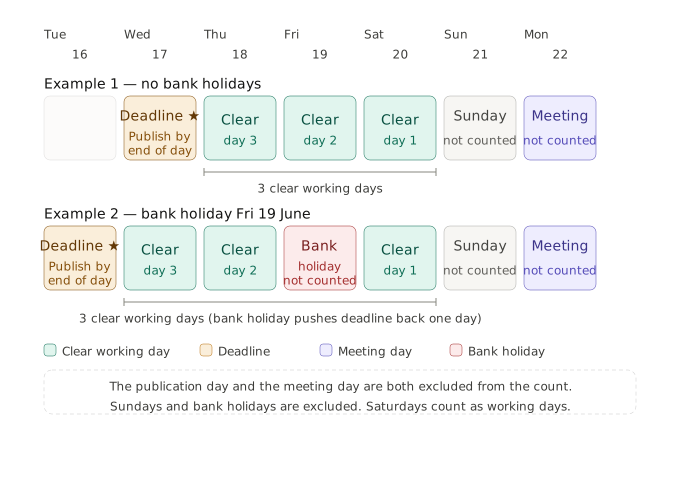
CouncilPapers performs this calculation automatically for every meeting, and it accounts for your council's bank holiday region (England & Wales, Scotland or Northern Ireland).
Where the deadline is shown
CouncilPapers displays the publication deadline in several places:
The Meetings list and the Dashboard — each forthcoming meeting that does not yet have a published agenda shows a colour-coded status badge with a short label.
The Meeting page and the agenda page — a banner at the top shows the status and the exact deadline: "[status]. — Agenda must be published by the end of [date]".
The status indicators
CouncilPapers uses three colour-coded statuses for forthcoming meetings that do not yet have a published agenda. Indicators appear once the meeting is within the look-ahead window — 10 days ahead, or your council's clear-working-days setting plus seven days if that is larger.
| Status | Label | Meaning |
|---|---|---|
| 🔴 Red | Publication deadline passed | The deadline has passed — the agenda is overdue for publication |
| 🟡 Amber | Publication deadline approaching | The deadline is today, or the next office day is the deadline — one more delay would breach it |
| 🟢 Green | On track | The meeting is coming up but the deadline is still comfortably ahead |
The indicators only appear for upcoming meetings without a published active agenda. Once an agenda has been published, the indicator is removed automatically. Past meetings are not shown.
What to do when you see Amber or Red
Amber means your publication deadline is imminent — today or the deadline day is the next office day. You should ensure your agenda is ready to commit and publish before the deadline shown on the Meeting page.
Red means the statutory deadline has passed. If the Agenda was not published before the deadline you will need to cancel and reschedule the meeting.
If the Agenda was correctly published before the deadline, CouncilPapers will still allow you to commit and publish the meeting after the deadline, but the date of committing is recorded and available for review.
Adjusting your council's notice period
The default minimum is three clear working days, matching the statutory requirement. If your council's standing orders require a longer notice period, you can increase this under Council in the left-hand menu.
Increasing the setting means CouncilPapers will calculate deadlines and show status indicators based on your longer notice period rather than the statutory minimum.
Last updated: 31 August 2026
See also
- Agendas, Versions and Committing Concept
- Committing an agenda Procedure
- Publication deadline settings Procedure
Need more help? Contact us
About CouncilPapers
Stop drowning in paperwork
Your meeting preparation shouldn't consume your week. Automate the tedious bits so you can focus on what matters.
Meeting records that stand up to scrutiny
Version-controlled, searchable, audit-proof—your agendas and minutes become a trusted record, not a liability.
Transparent, accessible council papers
Publish professional agendas and minutes to the web instantly. Show your community that decisions are made openly and carefully.