Concept Clerk ★ Priority
Starting point: the meeting has happened
Minutes are written after a meeting has taken place. In CouncilPapers, minutes are written against the agenda items of that meeting — each item can have minute text, a record of any decision made, and notes before or after the item.
Before minutes can be progressed, the agenda for that meeting must already have been committed. The minute-writing process works from that committed agenda as its foundation.
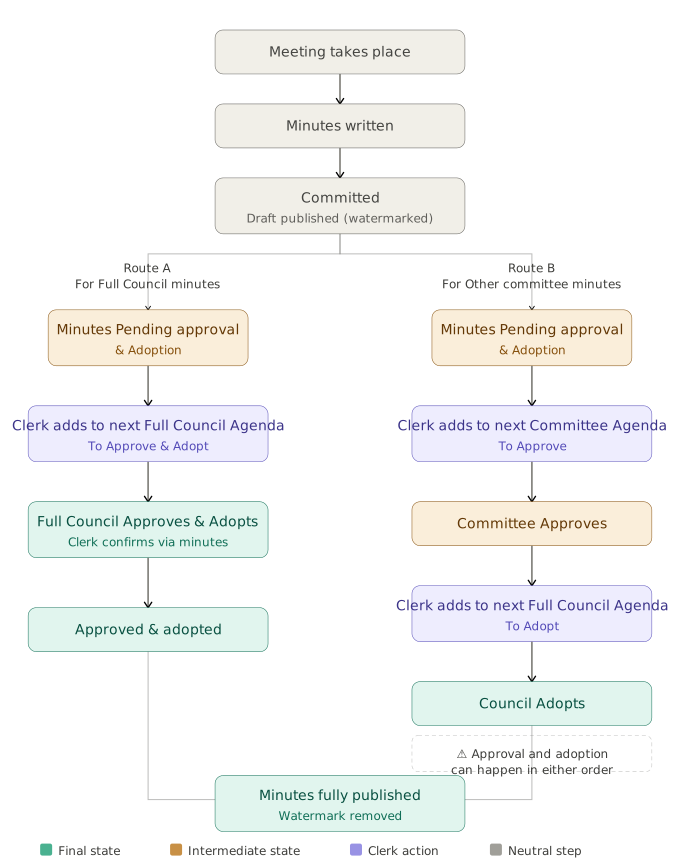
Step 1 — Writing and committing
The clerk writes the minutes in CouncilPapers and, when ready, Commits them. Committing minutes does two things:
- It locks the minute text — it cannot be edited directly after this point
- It publishes the draft minutes to councillors and the public (the commit is processed as a short background task, so this follows within a minute or two)
Draft minutes carry a watermark identifying them as a published draft. They are the full minute text — not a summary — and are accessible on the council's public portal as well as in the Councillor App.
If the minutes need to be corrected after committing, click Un-Publish Minutes to return them to an editable state. A record is retained that they were un-published and by whom.
Step 2 — Approval and Adoption
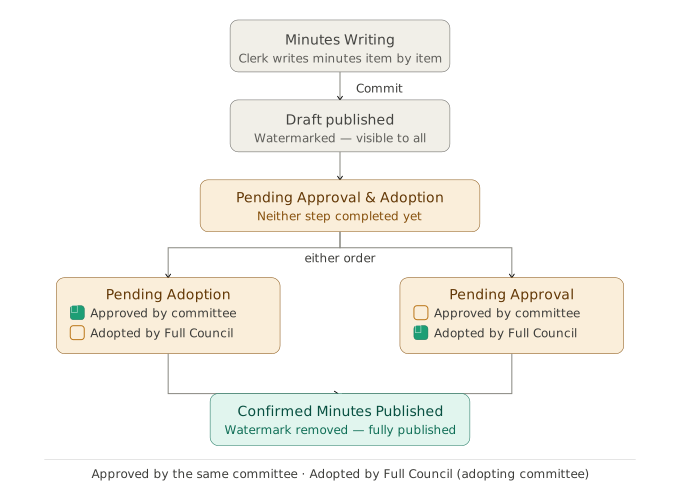
Once committed, minutes must go through two separate steps before they are considered fully published: Approval and Adoption. These are independent of each other and can happen in either order.
Approval
Minutes must be approved at the next (or a subsequent) meeting of the same committee that held the original meeting. Approval confirms that the minutes are an accurate record of what took place.
For example: the Planning Committee meets in January. Its minutes must be approved at a future Planning Committee meeting — typically the next one.
Adoption
Minutes must also be adopted by the council's adopting committee — typically the Full Council. Adoption is the formal acceptance of the minutes into the council's official record.
The adopting committee is configured for each council during setup. Every council must have one.
The adopting committee's own minutes
Where the adopting committee (usually Full Council) is both the committee that held the meeting and the adopting committee, it handles both Approval and Adoption together in a single agenda item. One confirmation covers both steps simultaneously.
Step 3 — Setting up Approval and Adoption on a future agenda
CouncilPapers does not progress minutes automatically. The clerk must explicitly set up the Approval or Adoption as an item on a future agenda.
When building any agenda, the Add Content dropdown beneath any item offers options depending on the committee:
- Setup Approval and Adoption of Prior Minutes (As [committee]) — on the adopting committee's agendas, where both steps for its own minutes are handled together
- Setup Adoption of Prior Minutes (of other Committees As Full Council) — on the adopting committee's agendas, for adopting the minutes of other committees
- Setup Approval of Prior Minutes (As [committee name]) — on any other committee's agendas, for approving that committee's own prior minutes
Selecting any of these opens a page listing all minutes that match that option and have not yet been approved or adopted accordingly. The clerk selects the relevant minutes using the checkboxes provided, and CouncilPapers automatically creates an agenda item with the correct wording and links to the original minutes.
Step 4 — Recording the outcome in the minutes
When the clerk comes to minute the meeting at which Approval or Adoption took place, CouncilPapers recognises that the agenda item is linked to prior minutes. A checkbox appears in the minutes form for each scheduled step, allowing the clerk to confirm that the original minutes were approved (and, where relevant, adopted) at this meeting.
Ticking the checkbox marks the original minutes accordingly. Once both Approval and Adoption have been confirmed, the draft watermark is removed and the minutes are considered fully published.
Summary of states
| State | Visible to public | Visible to councillors | Watermark |
|---|---|---|---|
| Being written (not committed) | No | No | "Writing" (on previews) |
| Committed (draft) | Yes | Yes | Draft Published |
| Approved only | Yes | Yes | Pending Adoption |
| Adopted only | Yes | Yes | Pending Approval |
| Approved and Adopted | Yes | Yes | None |
A note on timing
There is no fixed deadline in CouncilPapers for when minutes must be approved or adopted — this is a matter for the council's own standing orders. However, the convention is that minutes are approved or adopted at the next available meeting of the relevant committee. CouncilPapers will show minutes as pending approval or adoption until both steps are complete. The council's Health Check page will identify meetings that have missed having their minutes published, approved or adopted.
Last updated: 31 August 2026
See also
- Writing minutes Procedure
- Committing minutes Procedure
- The approval and adoption workflow Procedure
- Committees and the adopting committee Concept
Need more help? Contact us
About CouncilPapers
Stop drowning in paperwork
Your meeting preparation shouldn't consume your week. Automate the tedious bits so you can focus on what matters.
Meeting records that stand up to scrutiny
Version-controlled, searchable, audit-proof—your agendas and minutes become a trusted record, not a liability.
Transparent, accessible council papers
Publish professional agendas and minutes to the web instantly. Show your community that decisions are made openly and carefully.