Procedure Councillor ★ Priority
Logging in
Councillors log in to the Councillor App using the email address and password set up by the clerk. If a councillor has not yet set a password, the clerk can either set one directly or send a welcome email with instructions. See Adding a councillor.
The dashboard
After logging in, a councillor sees their dashboard, which is built around three areas.
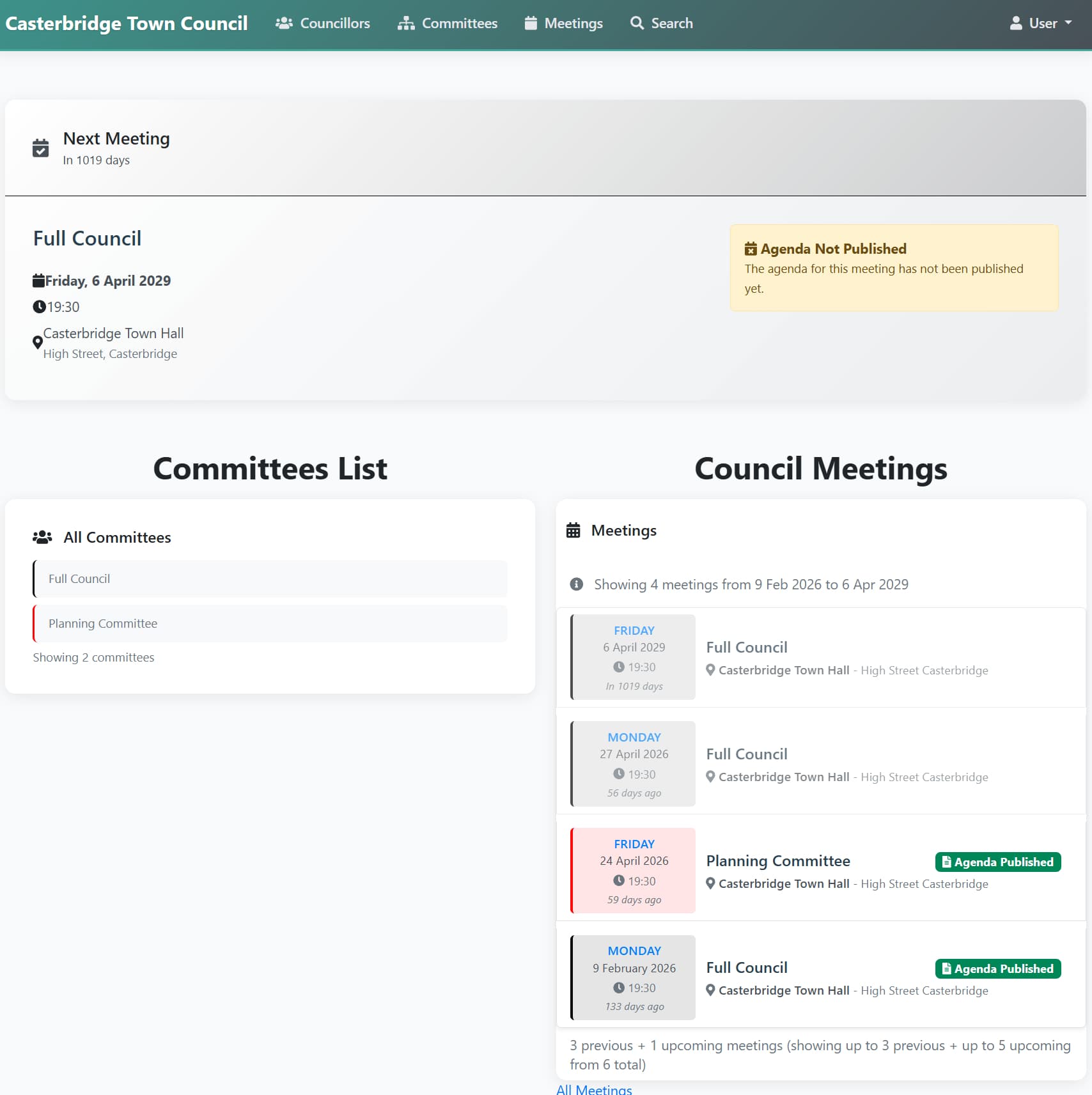
Next Meeting banner - a highlighted strip at the top showing how many days until the council's next meeting, with full detail beneath it: committee, date, time, and venue. If the agenda has not yet been published, an Agenda Not Published notice appears here instead of agenda details and link.
Committees List - every committee the council operates, shown on the left. Click any committee to see its membership, meeting schedule, and description. See Browsing the council.
Council Meetings - a list of meetings on the right, showing both recent past meetings and upcoming ones, with a count of how many of each ("3 previous + 5 upcoming meetings"). Each meeting shows its date, time, venue, and - once available - status badges:
| Badge | Meaning |
|---|---|
| Agenda Published | The agenda is available to view |
| Minutes Published | The minutes are available to view |
Clicking any meeting opens it in full - see Inside a meeting.
Navigation
The top menu provides access to the main sections of the app:
| Menu item | What it shows |
|---|---|
| Councillors | A directory of all current councillors |
| Committees | A list of all committees |
| Meetings | The full meetings list |
| My Actions | Matters the clerk has asked you to action |
| Search | Search across all council papers |
See Browsing the council, My Actions and Using search for more detail.
Use on Small Screens
The Councillor App is designed to work on small screens such as tablets and phones. Click on your user name in the top right to change the text-size used on a device.
Last updated: 20 June 2026
See also
- Browsing the council Procedure
- Inside a meeting Procedure
- My Actions Procedure
Need more help? Contact us
Built by a councillor, for council clerks
Save hours of paperwork per meeting
Write agendas and minutes once and publish them straight to your council's website. Councillors get them in the Councillor App. No re-typing, no uploading files one by one. See the features
Records you can stand behind
Agendas and minutes are version-tracked and searchable, with public and confidential versions kept apart. That helps you stay audit-ready, though the council remains responsible for its own compliance. Overview for clerks
Open, accessible council papers
Every agenda and set of minutes has an on-screen version designed to meet WCAG 2.2 AA — the standard the Public Sector Bodies Accessibility Regulations 2018 require. Your council's data is stored in the UK. Accessibility statement
Councillors get agendas, papers and past minutes in one secure app, not a pile of email attachments. Overview for councillors
Read our story